---
title: How can we change the colours of the size advice, such as the green elements?
description: You can set nearly all colours yourself, in the Faslet portal:
---
[Skip to content](https://site.faslet.me/knowledge-base/widget-colours#main-content)
- [English](https://site.faslet.me/knowledge-base/widget-colours)
- [Nederlands](https://site.faslet.me/knowledge-base-nl/widget-colours)
English
Show submenu for translations

- Solutions
Show submenu for Solutions
- [For Kids](https://site.faslet.me/en/products-kids)
- About
Show submenu for About
- [Blogs](https://site.faslet.me/blog)
- [Press](https://www.deondernemer.nl/innovatie/startup-van-de-week-faslet-oplossing-online-maattabellen~3789309)
- [Contact us](https://site.faslet.me/contact-us)
- Partners
- [Sign-up](https://portal.faslet.net/signup)
Open main navigation
Close main navigation
- Solutions
Show submenu for Solutions
- [For Kids](https://site.faslet.me/en/products-kids)
- About
Show submenu for About
- [Blogs](https://site.faslet.me/blog)
- [Press](https://www.deondernemer.nl/innovatie/startup-van-de-week-faslet-oplossing-online-maattabellen~3789309)
- [Contact us](https://site.faslet.me/contact-us)
- Partners
- [Sign-up](https://portal.faslet.net/signup)
- - [English](https://site.faslet.me/knowledge-base/widget-colours)
- [Nederlands](https://site.faslet.me/knowledge-base-nl/widget-colours)
English
Show submenu for translations
- Contact us
Contact us
How can we help you?
- There are no suggestions because the search field is empty.
1. [Faslet Knowledge Base](https://site.faslet.me/knowledge-base)
2. [Look and placement](https://site.faslet.me/knowledge-base/look-and-placement)
# How can we change the colours of the size advice, such as the green elements?
## The question
- Can we change colours in the size advice, such as the green elements, the red bar and the pink `find your perfect size`? Can you give us more access, or do we send you the changes?
- How can I change the coloured area at the top left of the pop-up, behind "The right size is less returns"? Can it be set separately?
- Can the buttons in the size advice get the same style as the buttons on our site?
- Can you make the size advice black and white?
## Applies to
- A shop with the Faslet size advice on its product pages; any shop platform
## Answer
You can set nearly all colours yourself, in the Faslet portal:
1. Open [Stores](https://portal.faslet.net/retailer), click your store, and stay on the **basic configuration** tab: the styling of the size advice is under Widget Configuration, General, with a live preview of the pop-up next to it.
2. Set the colours (a colour code, or the colour picker), check the preview, and click **save** at the top right of the page.
What each colour styles:
- **Primary Color:** the main button (such as "I am 175 cm"), the cm/ft switch, and the background of the top of the pop-up, which takes a light shade of it (light green for a green one, white for white) and shows wherever your header picture does not reach, usually on the left behind the text. That background cannot be set on its own.
- **Font Color:** the text on those buttons. With a light Primary Color, such as white, set a dark Font Color, or the text on the buttons disappears.
- **Secondary Color:** the band below the top ("Find your perfect size..."), and **Secondary Font Color** its text.
- **Header Font Color:** the title and text at the top of the pop-up, on the header picture (such as "The right size is less returns"), and the icons up there while the top is open.
- **Body Font Color:** the other text in the pop-up: the questions and headings, links, the buttons that are not the main one, the icons (close, back, profile) and the line at the bottom.
- **Add To Cart Button Color** and **Add To Cart Font Color:** the add-to-cart button at the end. With the same colour for both, for example white on white, the button looks like an empty box.
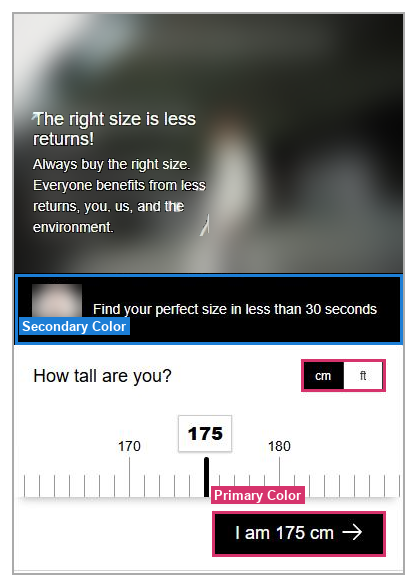
*A shop's size advice with both colours set to black; its own header picture is blurred.*
On Shopify, the Settings page in our app has the same colours, except the add-to-cart ones; the portal has the most options and the preview. Do the colours on your site not match the portal? Check the Faslet Button block's **Settings Source** in your Shopify theme editor: on "Faslet Partner Portal", the default, the colours from the portal are used; on "Theme Editor", the block's own colour settings are.
Want a colour of your own in the area at the top? That area is the header image: upload a picture in that colour as your header image (on the same basic configuration tab, under Widget Configuration, Popup: pick **Custom** at **Header Image**, choose your file, and click **save**), or send us the colour code and we put it in for you.
**The buttons** in the size advice keep their own style: they cannot take the style of your site's buttons. You can make them square: at **Rounded Corners**, in the same place, pick an option with Square Elements (for example Rounded Popup, Square Elements), and save. All buttons in the size advice are then square. Or ask us, and we do it for you.
The icon on the button, and its colour, we set for you: tell us which store it is for and what you would like, and we change it.
Cannot get the look you want? Send us a screenshot and what you would like, and we help.
- [Size advice](https://site.faslet.me/knowledge-base/size-advice)
- [Products and size charts](https://site.faslet.me/knowledge-base/products-and-size-charts)
- [Getting started](https://site.faslet.me/knowledge-base/getting-started)
- [Fit Bar](https://site.faslet.me/knowledge-base/fit-bar)
- [Look and placement](https://site.faslet.me/knowledge-base/look-and-placement)
- [Returns and orders](https://site.faslet.me/knowledge-base/returns-and-orders)
- [Integrations and API](https://site.faslet.me/knowledge-base/integrations-and-api)
- [Portal, reports and A/B tests](https://site.faslet.me/knowledge-base/portal-reports-and-a-b-tests)
- Solutions
- [For Kids](https://site.faslet.me/en/products-kids)
- About
- [Blogs](https://site.faslet.me/blog)
- [Press](https://www.deondernemer.nl/innovatie/startup-van-de-week-faslet-oplossing-online-maattabellen~3789309)
- [Contact us](https://site.faslet.me/contact-us)
- Partners
- [Sign-up](https://portal.faslet.net/signup)
[](http://faslet.me)
[mailto:email@email.com](mailto:email@email.com)
Copyright © 2026, Faslet B.V.