
The question
- We need to send our returns to Faslet through the Returns API. Where do we create an API token?
- Where do I find my API key?
- Which plan includes API access?
- Can we test against a test store first, so that what we send from our non-production environments does not end up in our live data?
Applies to
- The Faslet portal, App Marketplace screen
Answer
You can create a token for your store yourself in the Faslet portal. Don't see app marketplace in the portal's menu? Tell us which store it is for, and we switch it on for you. Not sure whether your plan includes our API? Ask us, and we check it for you.
-
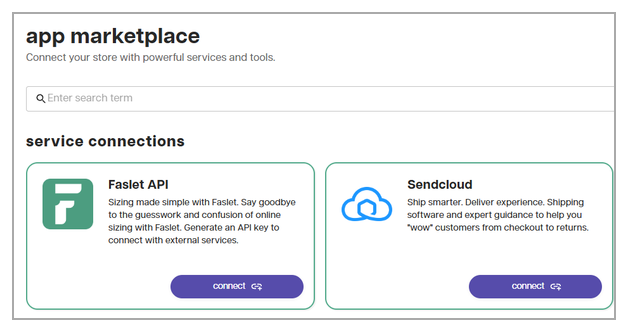
In the Faslet portal, open App Marketplace (app marketplace in the menu). If you have more than one store, pick the store in the store picker in the top bar first: each store has its own token.
-
Choose Faslet API and click connect. Click Generate API Token: your token shows in the panel, with a copy button. It shows there again each time you open the panel (edit on the tile). The other icon next to the token asks to replace it: use it only when you want a new token.
-
Your developer sends the token with every request, together with your store's shop ID in the
faslet-shopidheader. Your shop ID is in the portal: open Stores, click your store, and open its widget integration tab. The shop ID must be exactly your store's, letter for letter: with a typo, our API refuses the request. How the requests look is in our API documentation, and the return reasons are on the returns page.
Testing first: ask us for a staging store (our API documentation calls it a test store). It gets its own shop ID, and its own API token in the same place. Use that shop ID on your staging environment: everything you send from there stays apart from your live data. Once it works, switch to your live store's shop ID and token.
Tell us when your first data is sent, and we check that it arrives and is linked to your orders (see what our return data must contain).