
The question
- New products on our website don't show the Faslet button, although they use the same template as products that do
- A few of our products, such as our pre-order products, don't get the button; they show
Not Connectedin the Faslet portal - Our new items are live, with the fit on the product page, but not linked to a size chart yet
- Our own new product reaches Faslet from our PIM, but once it is in Faslet there is no Connect button. How do we connect it?
- Should we do something, or do you activate it?
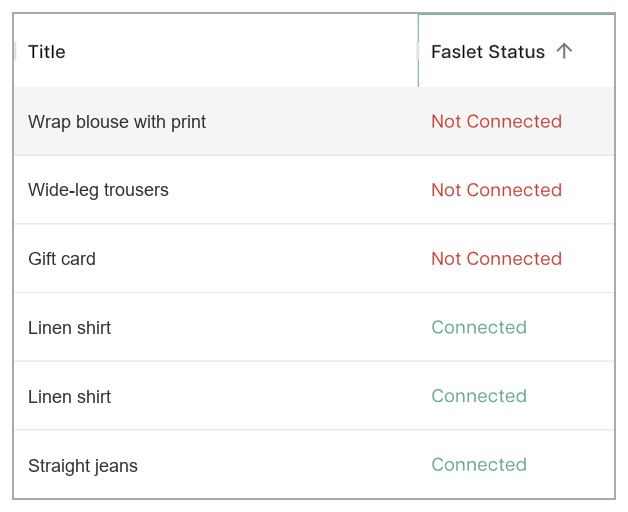
The retailer's view of the Products screen; product titles invented.
Applies to
- A shop whose products reach Faslet through a product feed or the Faslet Shopify app's product sync; any shop platform
Answer
We link your products to the right size chart on our side, and the button shows once a product is linked. Nothing needs to change in your shop or on your product page.
Can you link new products yourself? You do not need to: we link them automatically, at least once a day and often several times (it varies per shop and with load; see also our FAQ). A product that reached us after the last run has no button until the next one.
- Want the button straight away? Send us links to the new products, or their product numbers, and we link them by hand.
- Still no button a day later? Send us a link to the product, and we look into it.
- Want to see which products are linked? In the Faslet portal, open Products, pick your store in the top bar, and look at the Faslet Status column:
Not Connectedmeans not linked yet. - Launching a collection on a set date? Send us the list before the launch: see we launch a new collection soon.
- Want new products to get the button straight away next time? Have them reach us a day before the launch, through your product feed or, on Shopify, by setting them to Active (to keep them off your website until the launch, take them out of your sales channels, on the product's page under Publishing: they still reach us, as long as their sizes are under an option called Size or Maat): the ones we can place are then linked automatically.
Why it happens
- Faslet links new products to a size chart automatically at least once a day, often several times, by their name; a product that arrives in between has no button until the next run, and one whose name it cannot place waits for a check by hand
Is this your situation?
- The products without the button are ones you added recently, and your older products show it: this article.
- Your shop sends us no product feed, and new products stay without a button for days: not this article; without a feed, we link new products by hand, so send us links to them.
- You have just uploaded size charts for the new products: we are told about your upload and link the new products automatically. Still no button the day after your upload? Send us a link to the product.
- On Shopify, the new products have not reached us at all yet (not in the Faslet portal): not this article; they reach us once their Status is Active in your Shopify admin, not while they are in draft. Active and still not there? Tell us which products, and we look into it.
- Older products are missing the button too: not this article; often the brand or the product title we get is one we cannot place. Send us a link to one of them, and we look into it.