
The question
- Shoppers can still buy products we disabled in our theme, through Faslet's size advice.
- We take products offline in our theme, for example with a tag of our own such as
sold out, or with a coming-soon button until release: shoppers still see them but can't add them to the cart. Through Faslet they can still add them to the cart.
Applies to
- A Shopify shop with the Faslet app
- A theme that shows some products as not for sale through the shop's own tag, label or setting
Answer
Your theme decides what shoppers see on your product page, but Shopify decides what can be bought. A product you took off sale with your own tag or label still has stock in Shopify, so for Shopify it is still for sale. The last step of our size advice has its own add-to-cart button, and it goes by Shopify: it offers a size when Shopify has that size for sale.
-
The fix: take the sizes off sale in Shopify itself. Move their stock from Available to Unavailable. The units stay in your stock, but are no longer available to sell (Shopify's Inventory states ↗). Per size:
- In your Shopify admin, open the product, then click the size. Its Inventory card shows Available (1) and Unavailable (2).
- Click the Available quantity and choose Adjust by. Enter the number of units, move them from your location to Other, confirm with the tick, then save (3). How it works in full: Adjusting inventory quantities ↗.
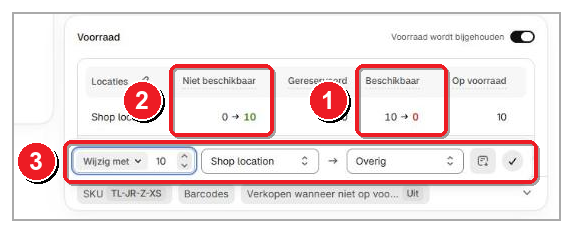
Shopify's admin in Dutch, before saving: 1 Available (Beschikbaar) goes from 10 to 0, 2 Unavailable (Niet beschikbaar) from 0 to 10, 3 the move.
With Continue selling when out of stock off, your online store then shows the size as sold out, and our add-to-cart no longer offers it. Moving the units back puts the size on sale again. You move the stock per size and per location: Shopify's bulk editor ↗ and inventory CSV import ↗ can't move stock to Unavailable.
Continue selling when out of stock is not this fix. It does the opposite: it keeps a size for sale at zero stock (Selling out of stock products ↗).
Stock synced from another system? An inventory system or ERP that sends your stock to Shopify, for example every day, can undo the move at its next sync. It depends on which quantity the connection sets. A connection that sets your Available stock puts the size back on sale. A connection that sets your On hand stock leaves the Unavailable units where they are. Ask whoever set up the connection which one it sets. That connection is outside Faslet, so we can't check it for you.
-
Short on time? We can leave the products out of Faslet once, as a one-off. Send us the links of the products, and we take the size advice off them until your stock is fixed. Tell us once it is, and we bring them back. This only covers our size advice: for Shopify the products stay for sale until then. More on hiding Faslet on some products: can you hide Faslet on some of our products for a while?
Not on Shopify? Ask us, and we look at it with you.
Why it happens
- The shop marks products as not for sale only in its theme (its own tag, label or setting), while Shopify still has them in stock and for sale
- Faslet's add-to-cart offers a size whenever Shopify has it for sale
Is this your situation?
- Open an affected product on your website, and add
.jsto the end of its address in your browser's address bar. Each size shows"available": trueorfalse. - Sizes
"available": truewhile your product page shows them as sold out: this is the cause, and the steps above fix it. - Sizes
"available": false, and our add-to-cart still offers them: not this cause. Send us the product link and a screenshot of the size advice.